IOS MOBILE APP
USER RESEARCH
INTERACTION DESIGN
END-TO-END UX

Meal planning and grocery shopping are completely disconnected experiences
People plan meals in one app, build grocery lists in another, and track their pantry on paper or not at all. The result is duplicate buying, food waste, and repeated store trips that could have been avoided with a single unified flow.
HarvestBasket was designed to connect all three into one seamless iOS experience, tailored to four very different user types with distinct shopping habits, household sizes, and priorities.
4
Distinct user archetypes served by a single unified app
5
Core user flows across the full app
46
Screens mapped before wireframing began
How people actually shop and plan
Research began with user interviews and competitive analysis to map existing grocery and meal planning behaviors. Information was synthesized and key insights with themes were discovered.
1
Fragmented tools
Users juggled between 2–4 separate apps or methods; notes apps, supermarket sites, and recipe platforms with no connection between them.
2
Food waste as a shared pain
Every persona experienced food waste, but for different reasons; impulse buys, forgotten pantry items, or over-buying due to poor planning.
3
Context-specific shopping behaviour
Urban users shop frequently in small batches; rural users buy in bulk once a week. The app needed to serve both models without compromise.
"I always end up buying things I already have at home because I never know what's in my fridge when I'm at the store."
— Interview participant, foundational research
Understanding the user before touching the design
Research began with four detailed personas; Laila, Maria, Omar, and Colin. Journey maps across 6 stages revealed friction points and drop-off moments. 12 themes and 5 opportunity areas were identified across all personas.
The personas that guided every design decision throughout the project. From information architecture, component hierarchy to interaction designs were based primarely on the users.
"I always end up buying things I already have at home then something expires before I use it. I need the app to tell me what to cook with what I've got."
— Composite insight from persona research


From research to architecture
The core challenge was building a navigation model that felt natural for both Laila's quick daily check-ins and Colin's weekly bulk planning sessions. The sitemap was structured to keep the most-used flows. Grocery list, meal plan, pantry is always one tap away.
1
Sitemap & information architecture
Navigation built around five primary tabs: Home, Meal Plan, Grocery List, Pantry, and Profile. The recipe search and pantry scanner being integrated closely.
2
User Flow Diagrams
Full flow diagrams with decision points, branches, and cross flow connections for all 5 flows.
3
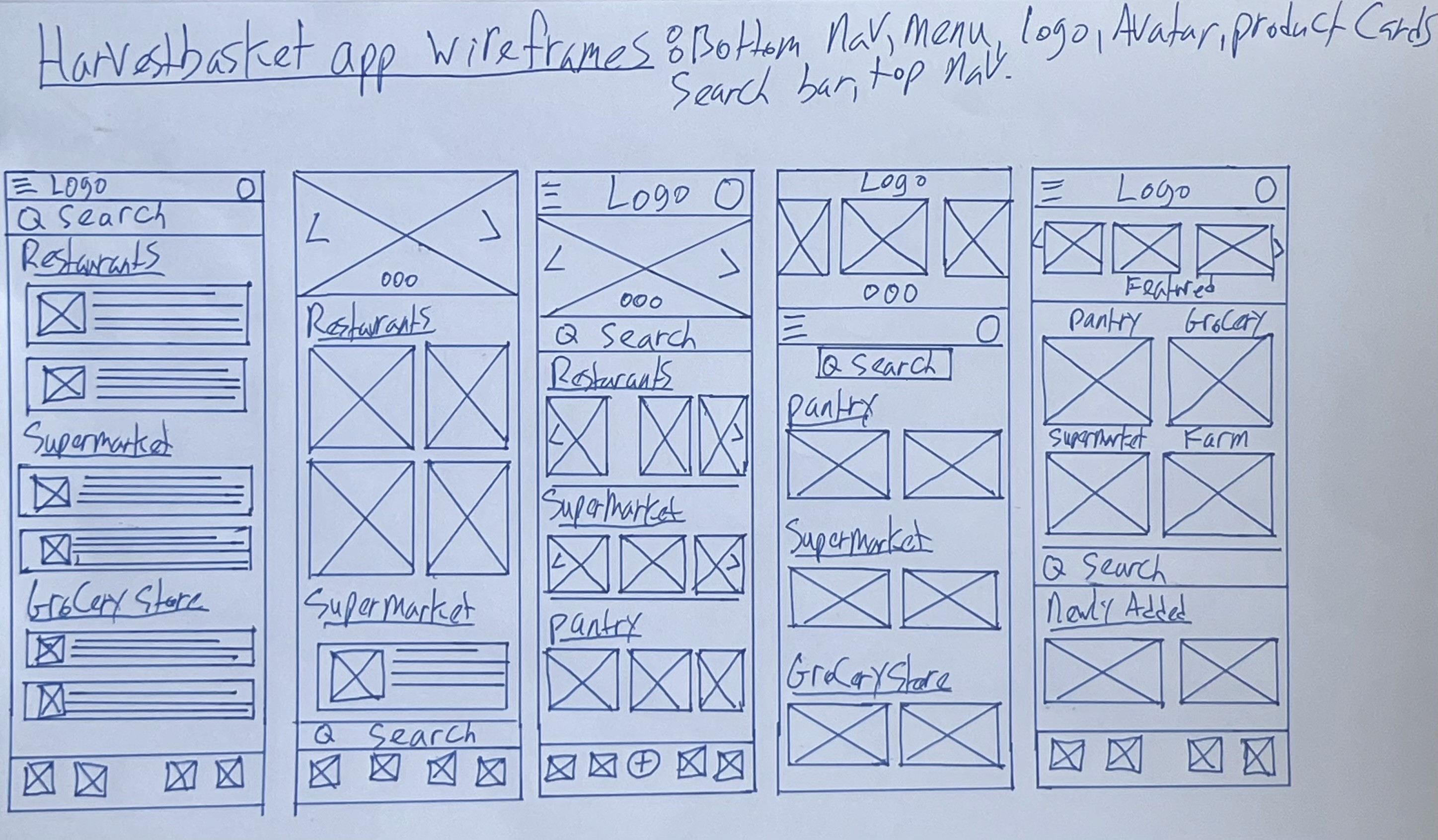
Paper wireframes multiple iterations
Several sketches explored different entry points for the meal plan/grocery list flow. The most intuitive path from each iteration was combined into the digital wireframe.
4
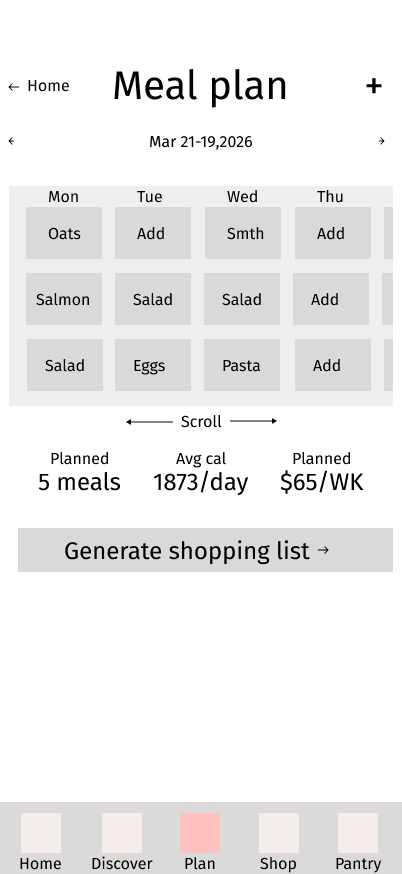
Digital wireframes 3 breakpoints
Meal planning front and center on the home screen, pantry tracker accessible from the grocery list, and a one-tap "add to list" from any recipe card.





Two rounds of usability testing: lo-fi & hi-fi
Two rounds of unmoderated remote usability testing were conducted. Lo-fi wireframes with 9 participants, then the hi-fi prototype with 10 participants. Both sessions covered 6–7 task prompts across onboarding, meal planning, recipe discovery, delivery ordering, and pantry management.
App — Lo-fi round · 9 participants
Lo-fi · Finding 01
Onboarding setup confusion
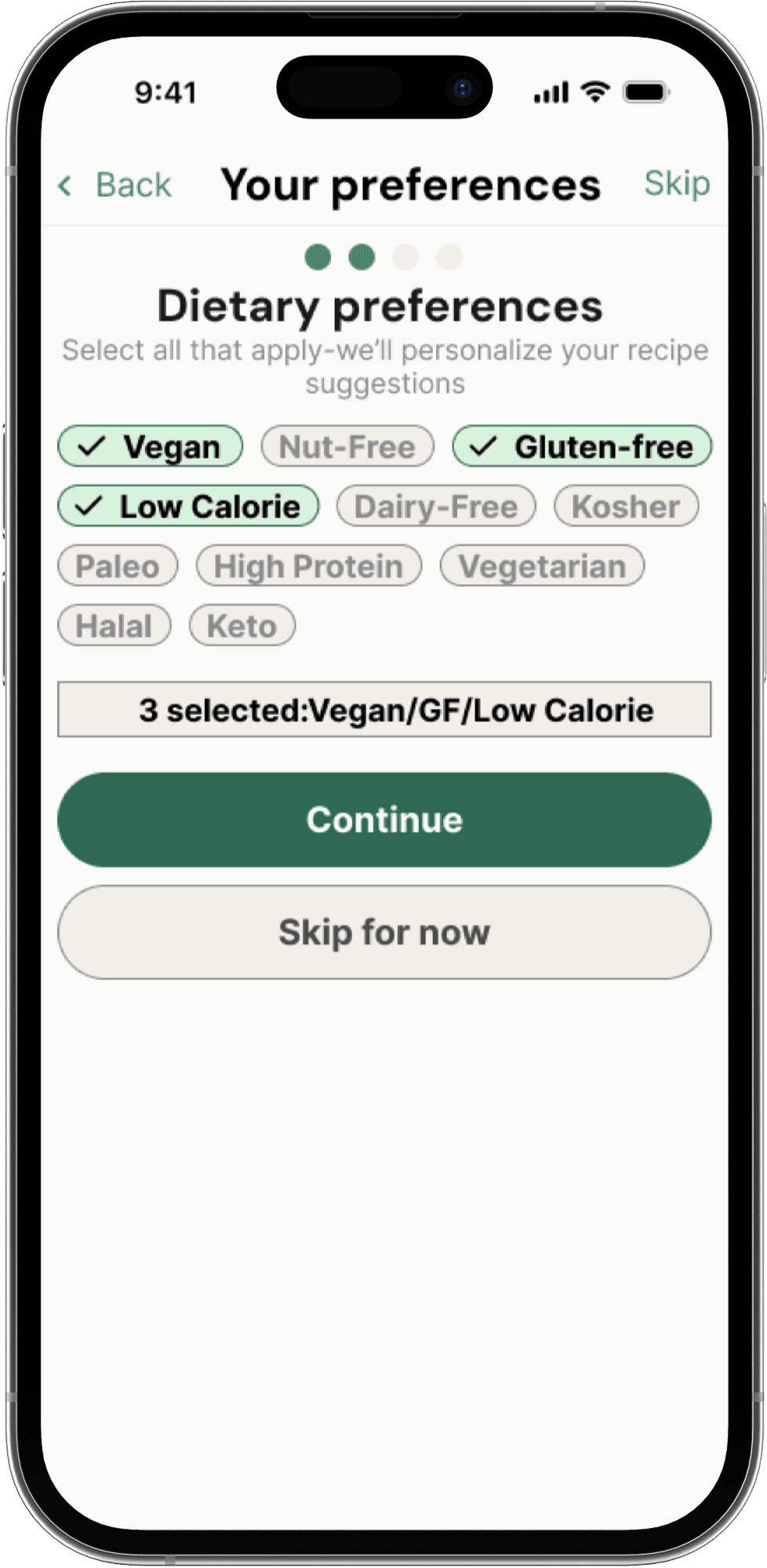
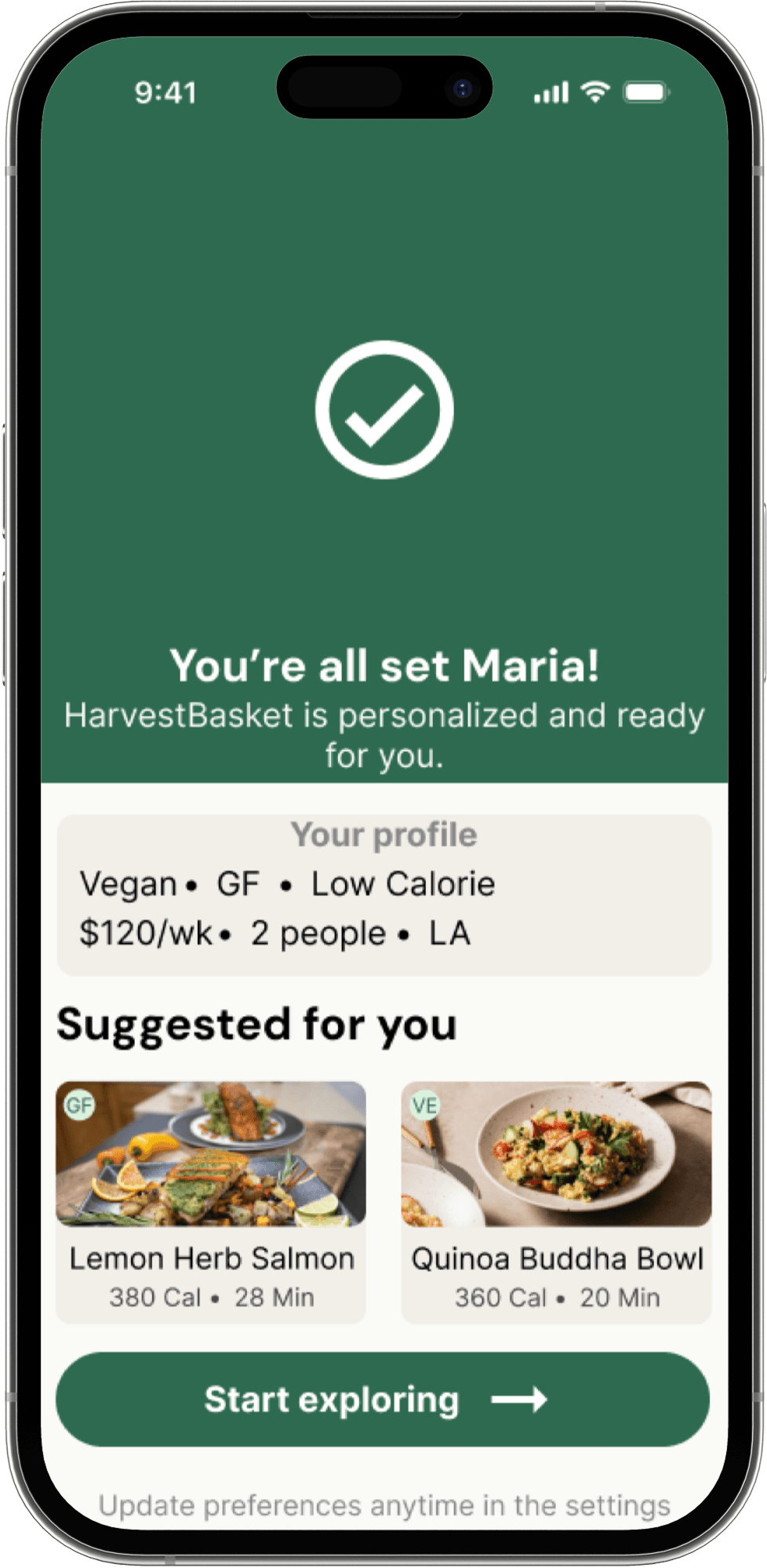
The budget input was unclear, users couldn't tell if it was a slider or a text field. The "you're all set" screen showed a name that was never collected during setup, and users expected a screen to enter their name, email, and password.
Lo-fi · Finding 02
Meal planning entry point unclear
Users instinctively tapped Tuesday on the home screen but nothing happened. They had to find "plan meals week ahead" in quick actions first. After adding a meal, the add button remained visible, making it unclear if the action was successful.
Lo-fi · Finding 03
"Next step" button broken in cook flow
Multiple participants couldn't progress through the recipe cooking steps because the "next step" button was non-functional in the prototype, preventing full evaluation of the cooking experience.
Lo-fi · Finding 04
Delivery time slots not clickable
Delivery windows were displayed but couldn't be tapped. Users could see the time options but were unable to select one, making the ordering flow feel incomplete.
Lo-fi · Finding 05
Pantry expiry flow has too many steps
After finding expiring items and selecting a recipe, users were required to regenerate a full shopping list with no back button available. Several participants found this flow confusing and overly long.
Lo-fi · Finding 06
Shop nav and cook now button unclear
The shop button in the navigation bar was described as unclear by participants. The "cook now" button was also flagged as too small and not prominent enough relative to surrounding elements.
Positive finding
Pantry expiry alerts & recipe suggestions well received
Participants found the expiring items alert and the "find recipes for all items" feature intuitive and genuinely useful, directly addressing the food waste problem the app was built to solve.
Positive finding
Overall flow rated intuitive by majority
Most participants described the app as easy to navigate. They praised the recipe discovery flow, delivery ordering steps, and the step-by-step cooking instructions with built-in timers.
App — Hi-fi round · 10 participants
An unmoderated remote usability study was conducted on the hi-fi prototype with 10 participants across 7 task prompts covering onboarding, meal planning, recipe discovery, delivery ordering, and pantry management.
Hi-fi · Finding 01
Budget display is confusing
Multiple participants couldn't distinguish between their remaining budget and total spent. The two figures displayed side by side caused consistent confusion at checkout.
Hi-fi · Finding 02
Low contrast on expiry alerts
Several users struggled to read the "tap to see", "use it up recipes" text. It was described as too grey and difficult to spot. The orange alert rectangle text also lacked sufficient contrast.
Hi-fi · Finding 03
Missing back navigation in some flows
Users felt stuck on certain screens with no clear way to go back. The meal plan section only had one back button, and some screens had no exit path at all.
Hi-fi · Finding 04
Onboarding end screen unclear
The "you're all set" screen after onboarding confused users, and items on screen appeared selectable but weren't. Users expected to be taken directly to the home screen.
Hi-fi · Finding 05
Recipe cooking timer purpose unclear
Users questioned why a timer appeared on steps that didn't require one. It was unclear whether it tracked cooking time, oven time, or personal elapsed time.
Hi-fi · Finding 06
Bottom navigation bar too small
The bottom nav bar was overshadowed by larger text above and went unnoticed initially. Multiple participants noted it was too small to be recognised as a primary navigation element.
Positive finding
Delivery flow praised as smooth
Positive finding
"Add to pantry when delivered" well received
Several participants specifically called out the automatic pantry update on delivery as a standout feature. Exactly the food waste reduction behavior the app was designed around.
Design System




HarvestBasket app prototype
Tap through the full iOS app - home, meal plan, grocery list & pantry
View Prototype
Brand Identity & Design Systems
Colour tokens, type scale, component library
20 Hi-Fi Screens
All 5 flows at iPhone 14 Pro resolution
Interactive Prototype
145 connections wired across all screens
2 rounds of testing
Lo-fi with 9 participants, hi-fi with 10 participants
What was delivered
A fully tested hi-fi interactive prototype built across 10 structured deliverables and validated with 19 participants.
10
Professional UX deliverables produced end-to-end
19
Usability study participants across 2 rounds
14
Usability issues identified and resolved
What I'd do differently
Starting usability testing at the paper stage would have caught the onboarding confusion and broken cook flow much earlier. This would have saved time and prevented late-stage redesigns.
Key takeaway
Designing for four different personas forces you to build systems, not screens. Every decision had to work for all four users while making the design stronger and more inclusive.
Dmitry Michin
Available for Work
Navigation